
Kuaishou Video Downloader – Free & Without Watermark
Kuaishou video downloader online is our free go to tool to download any Kuaishou/kwai video in seconds. Welcome to our free tool which is designed to help you save any video or audio from Kuaishou (also known as Kwai) directly to your device. Get your favorite content in full HD quality, with no watermarks, and without needing to install any app or software. It’s fast, simple, and works perfectly on any device.
TL;DR: Quick Guide
How to Use:
- Copy Link: In the Kuaishou app, tap Share > Copy Link.
- Paste: Paste the link in the box above and hit Get Download Link.
- Download: Choose HD Video (or Audio) to save.
Key Features:
- ✅ No Watermark & Original HD Quality.
- ✅ 100% Free & No App Installation needed.
- ✅ Works on All Devices (iPhone, Android, PC).
How to Download Kuaishou (Kwai) Videos in 3 Simple Steps
Our tool makes the process of downloading kuaishou videos really easy. Just follow these three simple steps to save any video you want.

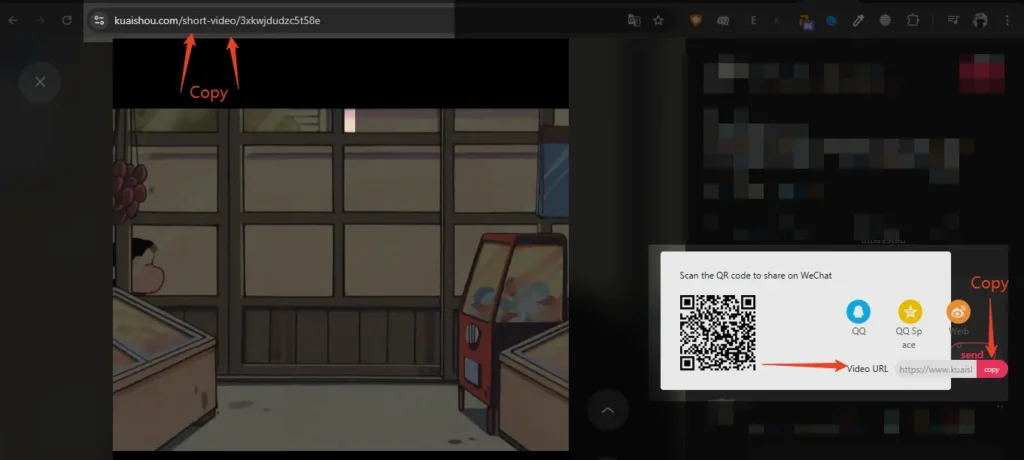
Find & Copy the Link
Open the Kuaishou app or website and find the video you want to save. Tap the “Share” button on lower right corner off Kwai app (it looks like an arrow) and then select the “Copy Link” option. You can also copy link from address bar of your browser as shown in our “How to download on laptop/PC” guide.

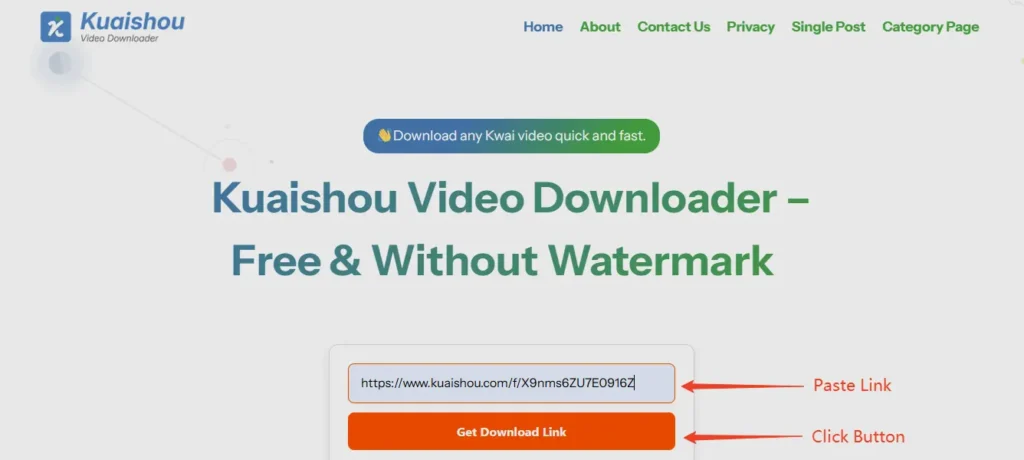
Paste the Link
Come back to our website and paste the link into the input box at the top of the page and click “Get Download Link” button. Our tool will automatically detect the video.

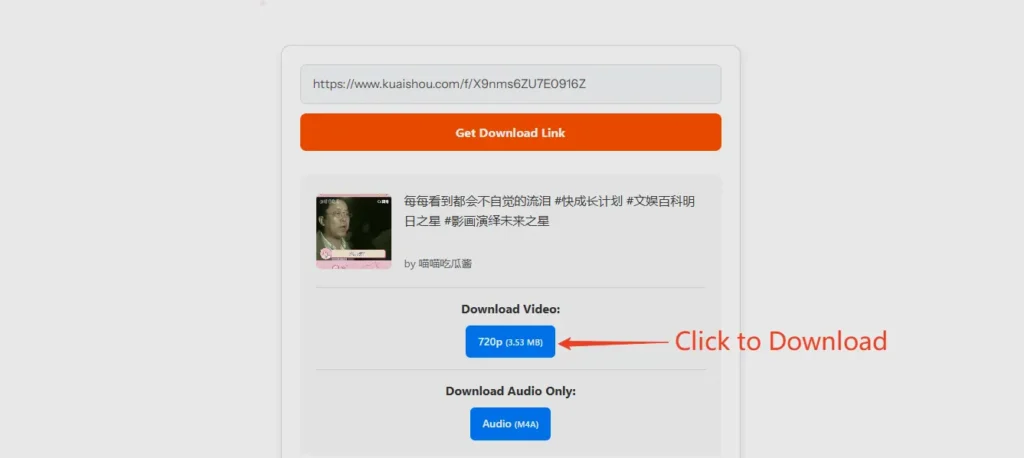
Download Your Content
After a few seconds, you’ll see a preview of your video and a list of download options. Choose your preferred quality (like 1080 or HD) and click the download button to save the video directly to your device.
Step 1
Step 2
Step 3
All Kuaishou Link formats Supported
You can use video link from the Kwai mobile app or copy Kuaishou video link from browser on your computer, our tool is designed to handle any type of Kuaishou or Kwai link you paste.
We support all link format types, including:
- Kwai app Links: https://v.kuaishou.com/KvSbXmcp
- International Links: https://www.kwai.com/…
- Share Links: https://www.kuaishou.com/f/…
- Direct Video Links: https://www.kuaishou.com/short-video/3x5645upptz4jyu
Why Our Kuaishou Downloader is the Best Choice
There are many tools out there, but ours is built to provide the best experience. We offer more features and greater flexibility than a standard kuaishou video downloader app.

Lightning Fast
Download kwai videos in seconds with our optimized servers and advanced technology.

Download Without Watermarks
The biggest reason users love our tool is for kuaishou video downloader without watermark capabilities. Every video you save is clean, with no distracting logos, making it perfect for sharing or personal projects.

Video, Photo, and Audio Support
This is more than just a video tool. You can use it to save Kuaishou photos in high resolution and even download the audio track from a video as a separate file.
Full HD Quality Downloads
Don’t settle for low quality. Our tool finds all available resolutions for your video, allowing you to download in HD, 1080p, and sometimes even 4k if the original creator uploaded in that quality.
Works on Any Device
Our Kuaishou downloader online tool works directly in your browser, meaning it’s compatible with every device. No need to look for a separate Kuaishou video downloader apk; this one website works for everyone.
Mobile: Perfect for Android and iPhone users.
Desktop: Works seamlessly on Windows, Mac, and Linux.

Completely Free & Unlimited
This service is 100% free to use. There are no hidden costs, no subscription fees, and no limits on the number of videos you can download each day.
Safe, Secure, and No Registration Required
Your privacy is our priority. You never need to log in or create an account to use our service. We do not store your videos or track your download history.
International Users
Fast & Reliable HD/4K Downloader
Our tool is used worldwide! Whether you search for tải video kuaishou (Vietnamese), descargar videos de kwai sin marca de agua (Spanish), kwai filigransız video indirme (Turkish), kuaishou 다운로드 (Korean), or baixar video kwai (Portuguese), our tool is here to help you save your favorite content. Using our Kuaishou video downloader tool is the best way to download Kwai videos out of all the methods to download Kuaishou Videos.
500K+
Downloads
50K+
Happy Users per month
99.9%
Success Rate
24/7
Available
Download Quality: HD, 1080p, 4K, or MP3 Audio
Not every downloader keeps the original quality. Our Kuaishou video downloader pulls the highest resolution the creator actually uploaded and lets you choose exactly what you need:
- 4K Ultra HD: when the original was uploaded in 4K, you get true 4K, completely watermark-free.
- 1080p / HD: the reliable default for the vast majority of Kuaishou and Kwai videos.
- Audio only (MP3): extract just the sound for music, voiceovers, or podcasts. See our Kuaishou to MP3 guide.
Why Choose Our Kuaishou Downloader
| Feature | This tool | Typical alternatives |
|---|---|---|
| Watermark | Always watermark-free | Sometimes watermarked |
| Quality | Up to source (HD / 1080p / 4K) | Often capped at 720p |
| Install / login | None (browser only) | App or account common |
| Audio (MP3) | Yes, audio-only option | Rarely offered |
| Devices | Android, iPhone, iPad, PC | Often Android only |
| Your files stored? | Never stored | Varies |
Common Problems & How to Fix Them
- "Invalid link" error: copy the full share link (tap Share → Copy Link inside the app) rather than copying on-screen text, and remove any extra words around the URL.
- Video won’t save on iPhone: Safari sometimes opens the file instead of saving it. Tap the Share icon, then Save to Files or Save Video.
- Quality lower than expected: the tool can only offer the resolution the creator uploaded; if the original is 720p, 4K won’t be available.
- Nothing happens after pasting: refresh the page and paste again; private or deleted videos return no result.
Is It Legal & Safe to Download Kuaishou Videos?
Downloading a Kuaishou or Kwai video for your own personal, offline viewing is generally fine. What matters is what you do next: if you plan to re-share, re-upload, or monetise someone else’s content, you need the original creator’s permission and must respect their copyright. Always credit creators when you repost.
On safety: our tool runs entirely in your browser session. We do not store your videos, your links, or any download history on our servers. Processing happens on the fly and nothing is retained. Because there is no login, there is no personal data to leak.
Works on Every Device
- Android: paste the link, download, and find your video in the Gallery or Downloads folder.
- iPhone & iPad: works in Safari and Chrome; save via the Share sheet into the Files or Photos app. See our full iPhone guide.
- PC & laptop (Windows/Mac): paste the link in any browser and the file downloads to your Downloads folder. See our full PC guide.
Frequently asked questions
Conclusion
Don’t settle for low-quality screen recordings or risky apps. We have built a platform that prioritizes quality, speed, and privacy. Our Kuaishou Video Downloader is the go-to choice for downloading your favorite Kuaishou video. You do not need any software installation to get watermark-free HD files directly to your device. Start downloading today from your browser directly with the tool that thousands of international internet users trust. Paste your link above and experience the difference of a true HD downloader.
Related Apps

RedNote Video Downloader
While saving content from Kwai is a great way to archive your favorite short clips, many creators also look to other massive social platforms for creative inspiration. If you frequently browse Xiaohongshu for lifestyle, fashion, or travel trends, you can easily save watermark-free media using a dedicated RedNote Video Downloader to keep your offline media library perfectly organized across multiple networks.