3 Best Ways to Download Kuaishou Videos Without Watermark
Imagine this: You’ve found it, the perfect Kuaishou (Kwai / 快手) video. It’s hilarious, inspiring, or has that one song you can’t get out of your head. You hit the “save” button in the app, open your phone’s gallery, and… there it is. The big, distracting Kuaishou logo and the creator’s username, floating over the video.
It’s a common frustration. For users who want to rewatch clips offline, create their own video compilations, or share a clean video with friends, the watermark is a problem. This is why “kuaishou video downloader without watermark” has become one of the most-searched terms by Kwai and Kuaishou fans.
You’re not just looking for a download; you’re looking for a clean download. The good news is that it’s not only possible, but it’s also easy when you know which methods are safe and effective. In this comprehensive guide, we will explore the three best methods to download Kuaishou videos without a watermark, breaking down the pros and cons of each so you can make the best choice for your needs.
Important: Only download videos you own or have permission to use and follow Kuaishou’s Terms of Service and local laws.
Method #1: Using an Online Video Downloader (Easiest & Safest)
This is, without a doubt, the most recommended method for the vast majority of users. An online video downloader is a tool that runs directly in your web browser (like Chrome or Safari). You don’t have to install any software, apps, or extensions.
This method is the top choice because it perfectly balances ease of use, safety, and compatibility.
Our free Kuaishou Video Downloader is the perfect example. It’s designed to be the fastest and simplest solution available.
How It Works in 3 Simple Steps:
The process is designed to be as simple as possible and generally follows three steps:
- Find & Copy the Link: Open your Kuaishou (Kwai) app or the Kuaishou website. Find the video you want to save, tap the “Share” button (it looks like an arrow), and then select the “Copy Link” option.
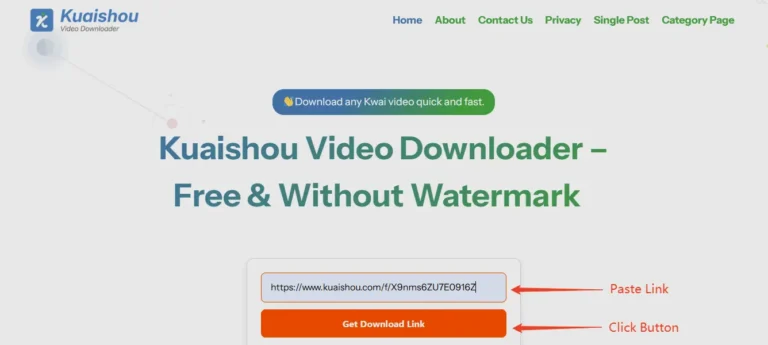
- Paste the Link: Open your web browser and go to a dedicated online tool. As the creators of this site, we built our Kuaishou Video Downloader to be the perfect, simple solution. You just paste the link you copied directly into the input box on our homepage.
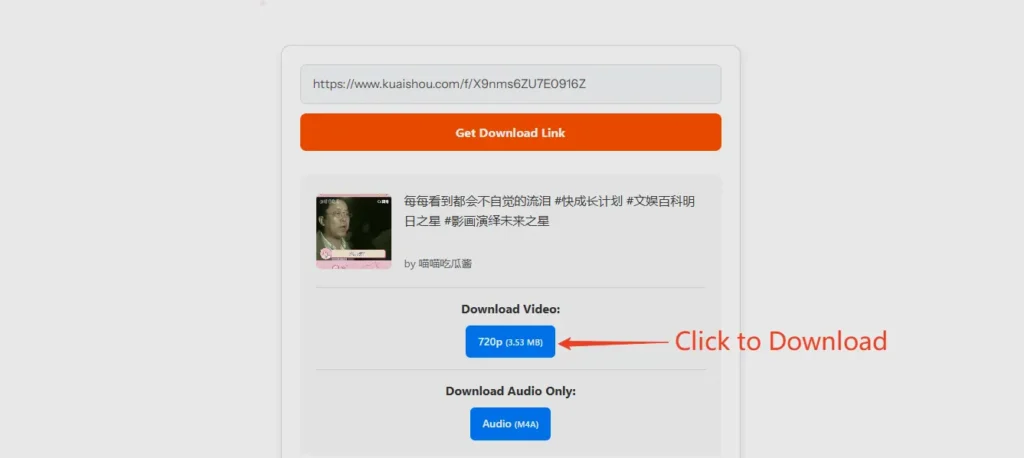
- Download Without a Watermark: Click the “Get Download Link” button. Our tool will securely fetch the video data and provide you with a preview, along with download buttons for different video qualities and an audio-only option. You click “Download,” and the clean, watermark-free MP4 file is saved directly to your device.
Why this is the best method:
- 100% Safe & Secure: Because you aren’t installing any software, there is a zero percent risk of downloading a virus, malware, or spyware. This is the single biggest advantage.
- No Installation Required: It doesn’t take up any storage space on your phone or PC. It just works, instantly.
- Universal Compatibility: This is a huge benefit. An online tool works on any device with a web browser.
- PC & Mac: Works perfectly on Chrome, Firefox, Safari, and Edge.
- iPhone & iPad: Works in the Safari browser.
- Android: Works in the Chrome browser.
- Always Up-to-Date: When Kuaishou changes its code, a dedicated app or extension might break. An online tool’s developer (like us) can update the server-side code immediately, so it’s always working for you.

Method #2: Using a Browser Extension
For users who primarily browse Kuaishou on a desktop computer, a browser extension is another popular option. These are small software add-ons you install into your browser (like Google Chrome or Firefox) that often add a “Download” button directly onto the Kuaishou website.
How a Browser Extension Works
Once installed, an extension will typically detect when you are on a Kuaishou video page. A small icon or button will appear, allowing you to download the video, often with options to choose the quality.
Pros & Cons of a Browser Extension
While they sound convenient, extensions have significant drawbacks that make them a less-than-ideal choice for most people.
Pros:
- Convenient: The download button is integrated directly into the Kuaishou page, which can feel seamless for heavy desktop users.
Cons:
- Massive Security & Privacy Risks: This is the most critical downside. To work, most extensions require broad permissions, such as the ability to “read and change all data on websites you visit.” This means a malicious or poorly-secured extension could potentially monitor your browsing, steal your passwords, or inject ads.
- No Mobile Support: This is a deal-breaker for most users. Browser extensions do not work on mobile browsers like Safari (iPhone) or Chrome (Android). This method is for desktop only.
- Frequent Breakage: When Kuaishou updates its website code (which it does often), the extension will instantly break and stop working. You are then forced to wait for the extension’s developer to publish an update, which can take days or weeks.
Our Verdict: While convenient for a small group of desktop-only users, the significant security risks and total lack of mobile support make browser extensions an unreliable and potentially dangerous option.
Method #3: Using an Android APK App
The third and most high-risk method is to find and install a “Kuaishou Video Downloader APK” on an Android phone. An APK (Android Package Kit) is an app file that you download from a third-party website and manually install, a process called “sideloading.”
People often search for this because Google has a strict policy and does not allow apps in the Play Store that download content from other platforms. This forces users to look for these tools on the “unofficial” web. This method is explored in detail in our dedicated article: Kuaishou Video Downloader APK: No Watermark (Latest Version).
Pros & Cons of an APK App
Pros:
- Offline Functionality: Once installed, the app is on your phone.
- Potential Batch Features: Some advanced APKs might (in theory) offer features like downloading all videos from a user, though this is rare and often unreliable.
Cons:
No Updates & Constant Breakage: Like extensions, these apps break every time Kuaishou updates its system. You are then forced to hunt for a new APK file, exposing yourself to security risks all over again.
Extremely High Security Risk: This is the most dangerous method. Sideloading an APK from an unknown website is the #1 way to get with malware and viruses, spyware, or ransomware on your phone.
Annoying Ads: Most of these “free” APKs are not free. They are adware, designed to flood your phone with aggressive pop-up ads and full-screen video ads, even when you aren’t using the app.
Our Recommendation: The Best Way to Download
After comparing the methods, using a trusted online tool is clearly the winner. It offers the perfect balance of safety, convenience, and quality, without the risks or downsides of extensions or APK files. Our Kuaishou Video Downloader is always free, secure, and ready to use on any device you own.
Why Do Kuaishou Videos Have Watermarks in the First Place?
This is a question many users ask. It’s not a bug; it’s a core business strategy. Understanding why the watermark exists helps you understand the entire Kuaishou ecosystem.
The Viral Growth Loop
The primary reason for watermarks is brand promotion. Think about how you share videos. You download a clip from Kuaishou and send it to your friends on WhatsApp, post it on Facebook, or share it on Reddit. That video now has a Kuaishou or Kwai logo on it. Your friends see the logo and the creator’s username. They think, “That was a great video. I wonder what ‘Kwai’ is?” They go to the app store, download the app, and Kuaishou has just acquired a new user, all for free. This is a “viral growth loop,” and it’s one of the most powerful marketing tools in the social media world. Both Kuaishou and TikTok have built their global empires using this exact strategy.
Protecting Creator Attribution
The watermark also serves as a crucial form of creator credit. When a video goes viral and is re-uploaded millions of times across different platforms, the watermark (which often includes the creator’s ID) is the only thing that links the content back to the original artist. It helps them get the recognition they deserve and allows new fans to find their profile.
The User’s Dilemma
While this is great for the platform and the creator, it’s a problem for the user who just wants a clean copy for personal use. If you want to use a clip in a family video collage, a school presentation, or as a clean background for your own content, the logo is a major distraction.
This is the exact problem our tool solves: it respects the user’s desire for a clean copy for their personal archives.
A Deeper Look: The Real Risks of “No Watermark” APKs
We’ve already mentioned that APKs are risky, but it’s important to understand the technical dangers. When you install an APK, you are giving an unknown developer deep access to your phone.
- Malware & Spyware Dangers: A malicious APK can be a “Trojan horse.” On the outside, it looks like a simple downloader. On the inside, it could be programmed to:
- Read your contacts and send them to a spam server.
- Access your photos and personal files.
- Use your camera or microphone without your knowledge.
- Install keyloggers to steal your passwords for banking or social media.
- Intrusive Adware: Adware is the most common issue. These apps will inject aggressive advertisements into every part of your phone. You might see pop-up ads on your home screen, in your notification bar, or even when you’re using other apps. This makes your phone slow and frustrating to use.
- No Updates & Constant Breakage: Kuaishou is in a constant battle with these apps. They update their platform’s code (their API) specifically to break these tools. When your APK stops working, you have to go looking for a new one, starting the dangerous download-and-install cycle all over again.
An online tool, like kuaivideodownloader.com, avoids all of this. It runs in your secure browser sandbox, cannot access your personal files, and is updated on our server, so it’s always ready for you.
Kuaishou Watermark vs. TikTok Watermark
You’ve likely seen watermarks from both platforms. While they serve the same purpose, they are technically different, which is why a “one size fits all” downloader often fails.
- The Kuaishou Watermark: Kuaishou’s logo is typically more static. It often appears in one corner of the video along with the creator’s ID and doesn’t move around.
- The TikTok Watermark: TikTok is famous for its dynamic watermark. The logo and creator’s name appear in one corner and then fade out, only to reappear in the opposite corner a few seconds later.
This “bouncing” TikTok watermark was a genius move to make it impossible to simply crop the video. You would have to crop all four corners, destroying the video’s framing.
Both platforms, however, use the same core method: they apply the watermark as a visual overlay after the original, clean video is processed. This is their secret.
Why You Can’t “Remove” a Watermark
Many users search for a “watermark remover.” This is the wrong approach. Trying to remove a watermark from an already-saved video requires complex AI or blurring filters that often create a messy, pixelated, and unprofessional result.
The only way to get a clean video is to intercept the file before the platform adds the watermark. This is exactly what a high-quality online downloader does. It accesses the raw video file from the server in its original, pristine form.
Expanded FAQ Section for “Without Watermark”
We’ve gathered the most common questions users have about this process.
For more details on our tool’s features, check out our full FAQ section.